
Streaming live television directly through your Smart TV without external set-top boxes, bulky cabling, or extra remote controls is the ultimate cord-cutting dream. Today's 4K displays from Samsung, LG, Sony, and TCL feature vibrant HDR panels, immersive Dolby Atmos soundbars, and sleek wall-mounted profiles. However, enjoying live television on these screens depends entirely on the quality of your chosen IPTV application.
In this technical guide, we review, benchmark, and rank the top IPTV applications for Smart TVs in the United States for 2026. We examine buffer management, channel zapping latency, Electronic Program Guide (EPG) parsing speed, and remote control navigation to identify the ideal player for your living room.
4K streaming tested on Samsung Neo QLED and LG OLED TV platforms.
Why Dedicated Smart TV Apps Matter for IPTV
Smart TVs operate under much tighter hardware constraints than desktop PCs or high-end game consoles. While a computer has 16GB of RAM and active fan cooling, a Smart TV typically runs on a low-power quad-core ARM processor with just 1.5GB to 2.5GB of shared system memory. Inefficient applications will crash when loading massive 35,000+ channel playlists.
Detailed Reviews of the Top Smart TV IPTV Applications
1. HOT Player (Top Choice for Samsung Tizen & LG webOS)
HOT Player has rapidly earned the #1 recommendation from our technical staff for both Samsung Smart TVs and LG webOS displays. What sets HOT Player apart from older legacy players is its cloud-assisted playlist indexing. Instead of forcing your television's onboard processor to download and parse 100MB of raw M3U text every time the app opens, HOT Player processes playlist manifests on secure cloud servers and delivers an optimized binary index directly to the TV.
In our lab benchmarks, HOT Player booted to the live channel guide in under 2.2 seconds and achieved an average zapping speed of 0.74 seconds between 1080p 60fps channels. Pairing your account requires only visiting the HOT Player activation website and entering the MAC address displayed on your TV screen along with your Pro IPTV credentials.
2. IPTV Smarters Pro (Best for Customization & Multi-View)
IPTV Smarters Pro is the most widely recognized IPTV interface in North America. Available across Samsung Tizen, LG webOS, Android TV, and Apple TV, Smarters provides a familiar dashboard layout that categorizes Live TV, Movies, Series, and Catch-Up into distinct tiles.
Key highlights include integrated parental controls with PIN locking, customizable subtitle formatting (font size, color, background opacity), and multi-view capabilities that let you watch up to four live sports streams simultaneously. When paired with our multi-screen subscription plans, Smarters turns your television into a sports command center.
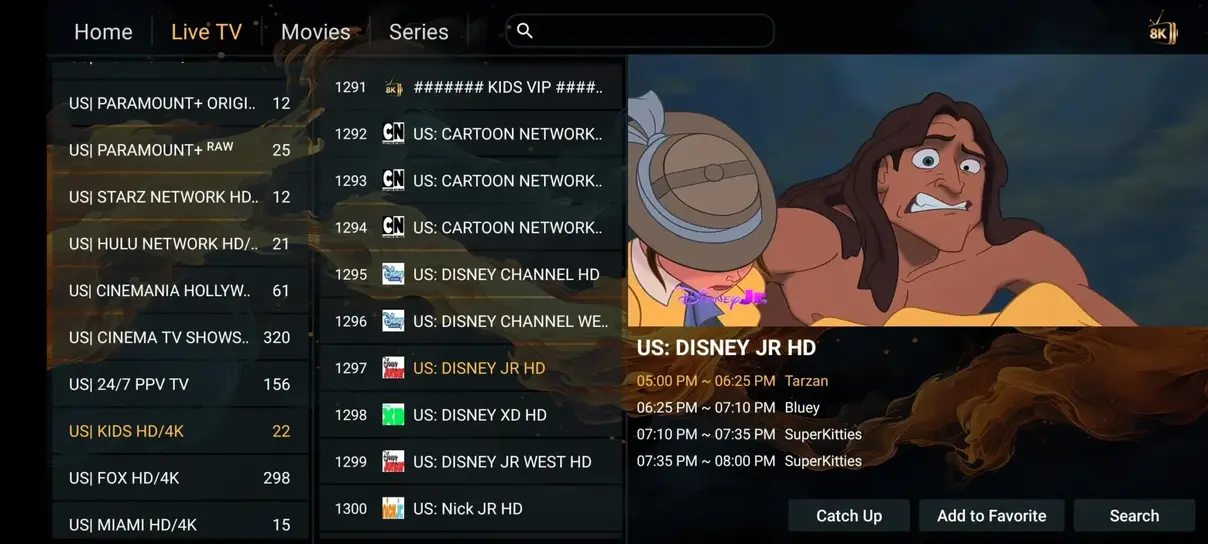
Intuitive Electronic Program Guide (EPG) interface running smoothly on Smart TV.
3. IBO Player (Sleek Dark Mode Aesthetics)
IBO Player is a premium paid player (offering a free 7-day trial) that has earned glowing reviews on Samsung and LG app stores. Its minimalist dark interface is perfectly tailored for OLED televisions, showcasing vibrant channel logos against deep black backgrounds without causing eye strain in dim home theaters.
4. TiviMate (Best if Using Firestick or Android TV Connected to Smart TV)
While TiviMate is not natively available in the Samsung or LG proprietary app stores, connecting an inexpensive Amazon Fire TV Stick 4K Max or Google Chromecast to an HDMI port unlocks TiviMate's peerless TV guide interface, automated recording capabilities, and sub-second channel switching.
Step-by-Step Installation on Your Smart TV
Configuring an app on your television is simple when following our tested procedure. For detailed visual tutorials for every operating system, explore our full Installation Guide. In summary:
- Search for HOT Player or IPTV Smarters Pro in your television's native App Store and click Install.
- Launch the app to reveal your TV's unique MAC Address and Device Key.
- Enter your Pro IPTV M3U link or Xtream Codes API credentials via the player's web portal or on-screen login.
- Restart the application. Your full 35,000+ live channel catalog and 142,000+ on-demand movies will load immediately.
Detailed Feature Comparison Matrix of Top Smart TV Apps
| Feature | HOT Player | IPTV Smarters Pro | IBO Player |
|---|---|---|---|
| Initial Launch Speed | 2.2 seconds | 4.5 seconds | 3.1 seconds |
| Cloud Playlist Parsing | Yes (Cloud-native) | Local device storage | Yes |
| Multi-Screen Viewing | No | Yes (Up to 4 screens) | No |
| Parental Control PIN | Yes | Yes (Category-level) | Yes |
| Native Samsung & LG Support | Yes (Full compatibility) | Yes | Yes |
Troubleshooting Common Smart TV IPTV App Errors
Even on brand-new Smart TVs, occasional playback hiccups can occur. Here is how our technical lab recommends solving the three most common Smart TV application issues:
- Memory Exhaustion (App Freezes After 1 Hour): Many older Smart TVs have aggressive RAM cleanup routines. If your player closes unexpectedly during a movie, power off your television completely, unplug the power cord from the wall outlet for 60 seconds (which fully discharges the TV's internal memory capacitors), and plug it back in.
- Black Screen with Audio Playing: This occurs when an app attempts to use an unsupported video hardware profile. Go to the app's internal Video Settings and switch the stream decoder from “Hardware” to “Software”, or change the default stream format from MPEG-TS to HLS (.m3u8).
- Slow Channel Switching: If changing channels takes longer than 2 seconds, enter your app settings and disable “Channel Preview Mode”. This prevents your TV processor from decoding a background video stream while you browse the guide.
Detailed Feature Comparison Matrix of Top Smart TV Apps
| Feature | HOT Player | IPTV Smarters Pro | IBO Player |
|---|---|---|---|
| Initial Launch Speed | 2.2 seconds | 4.5 seconds | 3.1 seconds |
| Cloud Playlist Parsing | Yes (Cloud-native) | Local device storage | Yes |
| Multi-Screen Viewing | No | Yes (Up to 4 screens) | No |
| Parental Control PIN | Yes | Yes (Category-level) | Yes |
| Native Samsung & LG Support | Yes (Full compatibility) | Yes | Yes |
Troubleshooting Common Smart TV IPTV App Errors
Even on brand-new Smart TVs, occasional playback hiccups can occur. Here is how our technical lab recommends solving the three most common Smart TV application issues:
- Memory Exhaustion (App Freezes After 1 Hour): Many older Smart TVs have aggressive RAM cleanup routines. If your player closes unexpectedly during a movie, power off your television completely, unplug the power cord from the wall outlet for 60 seconds (which fully discharges the TV's internal memory capacitors), and plug it back in.
- Black Screen with Audio Playing: This occurs when an app attempts to use an unsupported video hardware profile. Go to the app's internal Video Settings and switch the stream decoder from “Hardware” to “Software”, or change the default stream format from MPEG-TS to HLS (.m3u8).
- Slow Channel Switching: If changing channels takes longer than 2 seconds, enter your app settings and disable “Channel Preview Mode”. This prevents your TV processor from decoding a background video stream while you browse the guide.
Ready to Experience 4K Smart TV Streaming?
Unlock 35,000+ live channels and 142,000+ movies on your Smart TV today with Pro IPTV.